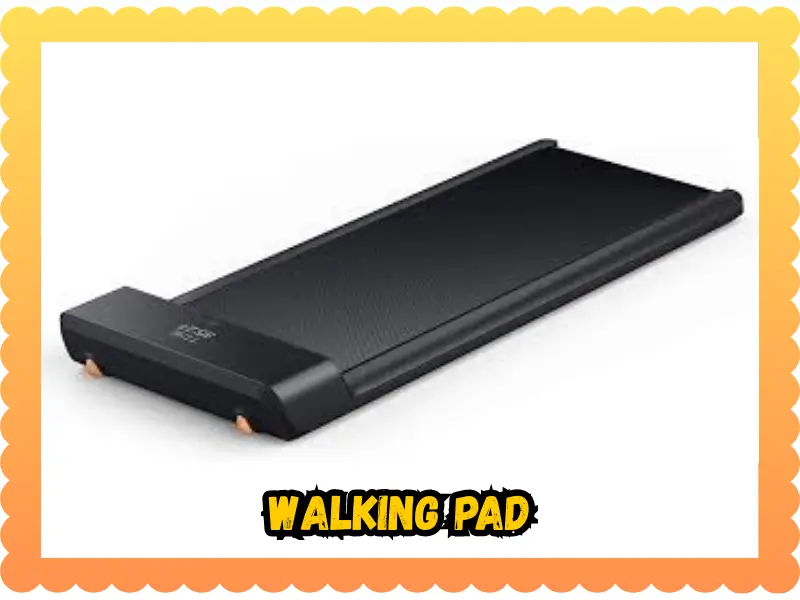
Last week in Miami, I stood on my machine ready to sweat. My heart sank when I found my walking pad not moving at all. It is a real pain when you have your shoes on but the belt stays still. I spent that morning finding the real cause so I could get back to my steps. Now, I want to share my own tips so you can fix yours fast.
Why your walking pad suddenly refuses to move
It always happens on busy mornings. I stepped on, coffee in hand, silence. The belt stared back at me like a stubborn cat. You feel a mix of annoyance and worry. Is the motor dead? Did I break the board? Usually, it is a small thing that stops the flow. These machines are tough, but they are also very picky. We will look at what makes them stall and how to get them back in gear.
What we’ll walk through
- Real-world causes: No myths, just the facts that matter.
- Safe fixes: Simple steps you can do in five minutes.
- Deeper checks: What to do if the easy stuff fails.
- When to stop: Knowing when a pro needs to step in.

Safety first, because motors bite sometimes
Quick note before we start. Electricity + moving belts = respect. I once tried to fix a belt while barefoot. The loud squeak still haunts me today. Never work on a live machine.
Basic safety checklist
- Turn power OFF: Hit the switch on the base first.
- Unplug from the wall: Pull the plug to be totally safe.
- Wait: Give it 90 seconds for the power to fade away.
- Stay dry: Keep wet floors and sweaty towels far away.
- Wear shoes: Protect your feet from the metal and the belt.
Common reasons your walking pad is not moving
Most issues show patterns. And usually… it’s simpler than it looks. Check these common faults first.
- No power: A loose plug or a tripped outlet is often to blame.
- Safety key: If the magnet is off its mark, the belt stays locked.
- No signal: A dead remote battery or a dusty sensor stops the start.
- Jammed belt: Debris or over-tightening can trap the rollers.
- Error codes: The screen might be telling you the motor is too hot.
Try these quick fixes first (do them in order)
We start easy, like rebooting a stubborn phone. These steps fix the most common glitches.
Power reset
Turn off the switch. Unplug the cord. Wait a minute. Plug it back in. Start at the lowest speed possible. It feels silly, but this “hard reset” works very often.
Try another outlet
Plug directly into a wall socket. Avoid cheap power strips as they can choke the juice. Listen for a hum or a click when you hit start. If it is silent, the outlet might be dead.
Check the safety key
Insert the magnet firmly into the slot. Flip it around if you are unsure. If the key is cracked, it might not trigger the sensor inside.
Check the remote or app
Put in new batteries. Do not mix old and new ones. Wipe any dust off the sensor. If you use an app, try to re-pair the Bluetooth.
When the walking pad turns on, but the belt won’t move
Lights on. No motion. Annoying. This usually means the motor is trying but the belt is stuck.
Check belt tension
If the belt is too tight, the motor struggles and stops. If it is too loose, it slips quietly without moving. You should be able to lift the edge of the belt about two inches.
Lubrication matters
Dry belts drag like sandpaper on a wood floor.
- Oil: Use only 100% silicone treadmill oil.
- Apply: Squirt it under the belt on both sides.
- Run: Let the pad run slow for 3 minutes to spread the oil.
Look underneath (gently)
Coins, hairpins, and pet fur are all big offenders. Unplug the pad and look for anything caught in the rollers. Remove debris with your hands or a soft brush.
Error codes and weird noises (pay attention here)
Sometimes the machine talks. Not in words, but in clicks, beeps, and even smells.
- Beeping: This often means overload protection. The motor is too hot to run.
- Grinding: This is a sign of dirty rollers or a belt that is off its path.
- Burning smell: Stop immediately. This is the biggest warning. Unplug the pad and let it cool. Do not try to start it again.
Deeper checks, only if you’re comfortable
If the easy stuff fails, you can look a bit closer. Use daylight and have a screwdriver ready.
Inspect the power cable
Look for cracks or bent prongs. If the cord feels hot, it is a bad sign. Replace it with a cable of the same spec only.
Peek inside the motor cover
Only do this if your warranty allows it. Look for loose plugs or burnt marks on the board. Dust buildup around the board can cause heat. Gently blow out the dust. If anything looks scorched, back away and call for help.
Maintenance mistakes that slowly cause failure
Most issues sneak up over months of use. Small errors lead to big repair bills.
- Over-tightening: This kills the motor and the rollers.
- Skipping oil: No oil means high friction and high heat.
- Carpet use: Using a pad on a thick rug blocks air. It traps dust inside the motor. Use a firm mat to keep the air flowing. I learned that after a very sweaty evening in August!
When to stop DIY and call a technician
There’s smart fixing and there’s dangerous fixing. Know your limits to stay safe.
Call support if you notice:
- Smoke or sparks.
- A screen that won’t stop flashing.
- Error codes that stay after a reset.
- Water damage from a spill.
Have this ready:
- Brand and model name.
- Your purchase date.
- What you have already tried.
How to prevent future “walking pad not moving” disasters
A little routine beats big repairs. It keeps your walk smooth and your wallet happy.
- Weekly: Wipe the dust and check the plug.
- Monthly: Lube the belt and check the alignment.
- Storage: Keep the machine dry and away from extreme heat.
Quick reality check
Bad days happen. Machines stall just like we do. We breathe, we troubleshoot, and maybe we laugh. Then, we fix the problem and walk again. Most of the time, your walking pad not moving is just a small hurdle you can jump.
Final Recommendation
Fixing a stalled belt is mostly about being calm and checking the basics. I found that a simple reset and a bit of oil fixed my issue. Keep your machine clean and don’t skip the lube. It makes a world of difference for the life of the motor.
FAQs
A walking pad not moving often points to a power or safety issue. Check the plug, safety key, and control panel before trying a reset.
This usually means a loose belt or low speed setting. Increase the speed slowly and check if the belt needs alignment or tightening.
Yes, extra weight can stop the motor to protect it. Make sure your weight stays within the walking pad’s rated limit.
Overheating or auto-stop features can pause the belt. Let the unit cool down, then restart it for normal use.
Yes, dry belts create friction and slow movement. Add the right lubricant to help the belt move smoothly again.
A worn motor can stop belt motion. Listen for odd sounds and consider a service check if problems repeat.
If resets and belt fixes fail, replacement may be best. Ongoing motor or control board issues often cost more to repair.

Founder, Owner, and CEO of TaekwondoKing.
He is one of the top 100 martial artists in the World and among the top 20 referees in Bangladesh.
Ehatasamul Alom is an esteemed Kukkiwon Certified Taekwondo 3rd Dan Black Belt with over 15 years of experience in this dynamic martial art. Born in Rajshahi, Bangladesh, Ehatasamul’s journey with Taekwondo began at the tender age of seven. His passion led him to compete at national and international levels, where he has bagged numerous awards and honors. He is also a member of the Taekwondo National Referee Panel.
With a Bachelor’s degree in Sports Science from the prestigious Rajshahi University, Ehatasamul has a deep understanding of the technical and scientific aspects of martial arts and some other martial arts.
In 2022, Ehatasamul created the “TaekwondoKing.com” to share his knowledge, Free Resources, Values, and Real experiences. His articles focus on Taekwondo training techniques, competition strategies, Sport Products Reviews, and the art’s rich history and philosophy. He also writes about the importance of mental fortitude and discipline, key aspects of his teaching philosophy. He has already launched many sports, Taekwondo, and health-related Free online tools. His goal is to inspire both beginners and seasoned practitioners worldwide through insightful and engaging content.
If you need any help, contact Ehatasamul Alom at any time.