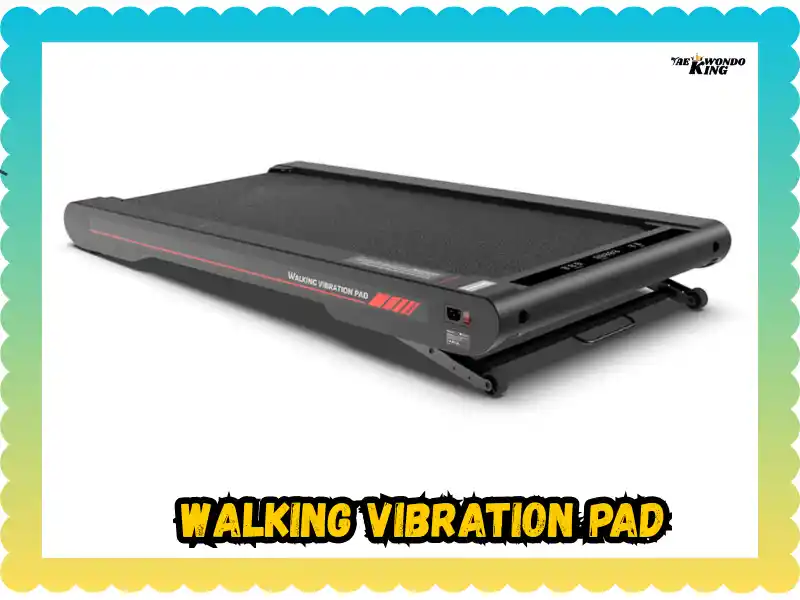
Last week in Boston, I stood in my gym gear ready to train. My heart sank when I found my walking vibration pad not working after a long day. It is a real pain when your fitness tool just sits there like a heavy rock. I spent that morning learning how to bring it back to life. Now, I want to share my tips so you can fix yours fast.
Why your walking vibration pad stopped, and always on busy mornings
It was Saturday, laundry everywhere, coffee going cold, and the vibration pad just sat there like furniture. Annoying. Very. I felt like the machine was mocking my fitness goals. Usually, these pads are quite tough. They fail for small reasons that we can often fix at home. We will look at why this happens and how to get moving again.
What we’ll cover (quick glance)
- Real troubleshooting: Simple, hands-on steps that work.
- Safety-first steps: How to avoid a shock while you work.
- Common faults: The usual suspects like cords and remotes.
- When to stop: Knowing when to call a pro for help.

Start here: stay safe before pressing any buttons
Just a moment. Electricity, motors, and metal plates don’t forgive mistakes. I learned this the hard way once, barefoot, on a tiled floor. Nope. Never do that. Always respect the power cord.
Basic safety checks first
- Turn off the unit: Switch it to the “off” spot.
- Unplug from the wall: Pull the plug so there is no juice.
- Let it discharge: Wait for 60–90 seconds for the power to fade.
- Keep it dry: Keep water bottles and oils far away.
Most common reasons a walking vibration pad is not working
Sometimes it’s simple. Sometimes it’s stubborn. And sometimes… it’s the remote.
- Power connection issues: A loose plug or a bad cord is a top cause. Check your wall switch too.
- Faulty safety key: If the magnet is missing or off center, it won’t fire.
- Dead remote: Batteries die or lose their sync with the board.
- No vibration: The lights are on, but the motor is quiet. This could be a blown fuse.
- Error messages: If it beeps or shows a code, write it down. Those clues help more than guessing.
Simple troubleshooting steps to try at home (do these in order)
Just like fixing a stubborn TV, start easy. These steps save time and stress.
Power cycle reset
Unplug the cord. Wait a minute. Plug it back in. Restart slowly. It feels silly, but it works a lot.
Try another outlet (no power strips)
Plug the pad directly into the wall. Avoid cheap extension cords. Look for sparks, warmth, or a buzzing sound.
Replace or reseat the remote batteries
Use fresh alkaline batteries. Clean any rust from the metal tabs. Point the remote right at the sensor.
Check the safety key
Reseat the magnet firmly on the pad. If you have a spare, test it to see if the old key is weak.
When the vibration pad turns on, but doesn’t “feel” right
You know that weird half-buzz? Like an old phone on mute. It should feel smooth and strong.
- Weak vibration: Look for loose screws or a loose plate. Check if the mode is set to a low speed.
- Jerky movement: Make sure the floor is flat. Check the rubber feet for wear.
- Strange smells: If it smells like burning, stop immediately. Let it cool down and do not be brave.
Digging a bit deeper (only if you’re comfortable)
Some fixes require patience and a small screwdriver. Use good light so you can see the small parts.
Check the power cord and fuse
Look for cuts in the wire. Inspect the ends of the plug. If the fuse is dark, replace it with the same type.
Open the bottom cover
Only do this if your warranty allows it. Unplug the power first. Look for burnt marks or loose wires. Gently press any loose plugs back into place. If you hear crackling, close it and walk away.
Maintenance mistakes that quietly cause failure
Most problems don’t appear overnight. They creep in when we stop caring for the tool.
- Dust build-up: Dust blocks vents and makes the motor hot.
- Overloading: Every pad has a weight limit. Stay within it.
- Long usage: Give the machine a break. Motors feel the heat just like we do.
When to stop DIY and call support (or a technician)
There’s confident repair, and then there’s guessing. Don’t risk a fire or a broken part.
Call for help if you notice:
- A strong burning smell.
- Loud popping sounds.
- Fuses that keep blowing.
- A water spill inside the case.
Have this ready:
- Brand and model name.
- When you bought it.
- The error codes you saw.
Prevent future “walking vibration pad not working” moments
A little care goes a long way, like oiling a squeaky door. It keeps the machine happy for years.
- Weekly: Wipe off the dust and check the cables.
- Monthly: Inspect the screws and check the remote batteries.
- Storage: Keep it off damp floors. Cover it if you don’t use it for weeks.
Final Recommendation
Finding your walking vibration pad not working can be a real drag. But most of the time, it is just a loose wire or a dead battery. I found that staying calm and checking the power cord first saved me a lot of money. Keep your machine clean and dry to avoid these headaches.
FAQs
A walking vibration pad not working often means no power. Check the plug, outlet, and power switch. Try a different socket to rule out simple power issues.
This can happen due to a loose motor wire or low setting. Increase the speed level and check the control panel for error lights or reset options.
Yes, a weak remote battery can stop commands. Replace the remote battery and try manual controls on the vibration pad itself.
Overheating or safety timers can shut it off. Let the pad cool down, then restart it after 20 minutes for safe use.
Yes, exceeding the weight limit can stop vibration. Check the user manual and ensure the pad is used within its rated capacity.
This may point to a motor or belt issue. Turn it off and inspect for loose parts or contact customer support for repair advice.
If resets fail and vibration never returns, replacement may be best. Internal motor faults often cost more to fix than a new unit.

Founder, Owner, and CEO of TaekwondoKing.
He is one of the top 100 martial artists in the World and among the top 20 referees in Bangladesh.
Ehatasamul Alom is an esteemed Kukkiwon Certified Taekwondo 3rd Dan Black Belt with over 15 years of experience in this dynamic martial art. Born in Rajshahi, Bangladesh, Ehatasamul’s journey with Taekwondo began at the tender age of seven. His passion led him to compete at national and international levels, where he has bagged numerous awards and honors. He is also a member of the Taekwondo National Referee Panel.
With a Bachelor’s degree in Sports Science from the prestigious Rajshahi University, Ehatasamul has a deep understanding of the technical and scientific aspects of martial arts and some other martial arts.
In 2022, Ehatasamul created the “TaekwondoKing.com” to share his knowledge, Free Resources, Values, and Real experiences. His articles focus on Taekwondo training techniques, competition strategies, Sport Products Reviews, and the art’s rich history and philosophy. He also writes about the importance of mental fortitude and discipline, key aspects of his teaching philosophy. He has already launched many sports, Taekwondo, and health-related Free online tools. His goal is to inspire both beginners and seasoned practitioners worldwide through insightful and engaging content.
If you need any help, contact Ehatasamul Alom at any time.